Probe for Windows Help: Forecast Rain and ET
Probe For Windows can use forecast rain and evapotranspiration (ET) when calculating required irrigation, both for the next irrigation and also for the whole season
The total amount of forecast rain in the next 7 days can be calculated for each site,
and the value is left in variable %ForecastRain%.
This could be used in...
- An email with: %ForecastRain% mm rain forecast in the next %dripdays% days
- A graph report (.gpt): %ForecastRain%:amt:1 rain is forecast in the next %dripdays% days
- In a text report (.rpt): Formula: ForecastRain, format: AMT
- On the sites screen (.spt): Formula: ForecastRain
The predicted rainfalls will also be shown on the time graph if GraphMenu/Options/Local tab: Time Graph Plot delivered rain: (using graph style='Rain/Predicted' [ID=80])
Predicted effective rainfalls (over FULL = runoff) will only be plotted if they are different from the forecast amount (graph style='Rain/Predicted/Effective' [ID=79])
Forecast ET can be used to schedule the next irrigation - see with Forecast. The current value of ForecastET will be shown
The value of ET will be shown on the graph if Formual with source=ForecastDWU
A Location is an geographic area that ha steh same forceat. All site sallocatd to a Location will us ethe same forcats
Each location has 'Scenario's - rain, ET, temperrature, etc (scenario is a sill name) Each scenario can get its vale indepdantly from oteh rscenarios in the location Thsi allows ET, fro example, come from a diffrent forcast service thatn 'remperateure It also allow the value sto come from historical wetaherfiels - n
Each Scenario csbv file that is downlaode from a Forcast, and its own options teh calculate
A location needs adding for each area, and a scenario needs to be added for each value
Each is then allocated to a location on ReadingsMenu/Scheduling tabb???
When a location is selected, the same location can be set for all oteh rsites for the groeer
ProbeMenu/Forecast
There are various on-line providers of weather forecasts. Some are free, and some charge for specialised reuirements
Most require the GPS lat/lon of a forecast location
Sentek users can get a forecast that includes both rain and evapotranspiration (ET).
A Meteoblue forecast location and API Key is required, which can be got from an IrrimaxLive account
The location of a site is set ReadingsMenu/Scheduling tab: Options
When a site is allcated to a location, all sites belonging to that grower can be optionally set to the same location.
Each grower can also be allocated to a location - see FarmMenu/Edit tab: General
Users will be asked if they want to set all sites for the grower to the same location
ProbeMenu/Forecast
To enable forecast ???
- Add a location for each forecast area
- For that location, add a Rain and/or ET ???
Location

tab: Locations
- Only active Locations can be selected for a site
Scenarios

tab: Scenarios
- File: examplehigh.ran - a comma-delimited text file with rain amounts
- Date Column: the column in the file that has the date
- Adjust dates: If a 'historical' weather file is being used, the date in the file could be for a previous season
if , the date will be adjusted so that it is within the current season (??) - Rain Column: the column in the data file that has the rain amount
- Total-by-day: Some weather files will have a value every hour
if a daily total rainfall will be calculated - Header lines: the number of header lines if the file that should be skipped - default = 1
- Minimum: rainfalls below this value will be ignored
- Units: the units of the data in the data file - mm or ins. (All internal calculations are in metric)
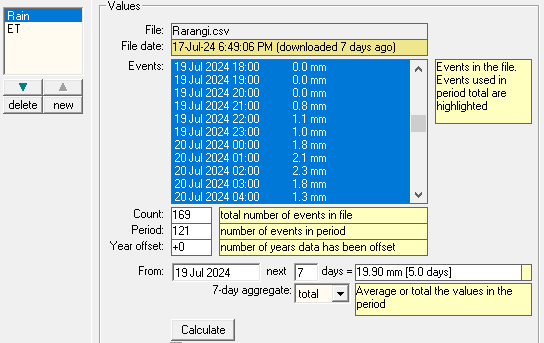
tab: Values
- Displays the rainfall events and the values found in the file
- This tab is just for checking - the calculated
%rainfall%amount for each site will be from the date of the last reading, for the following 7 days - A period can be specified for calculating total rain in the period
- Rainfalls found in the period will be highlighted
- The total amount in the period will be shown
- - re-load all rainfall files to update values
Download
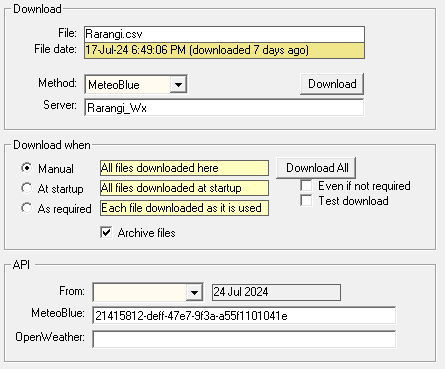
tab: Download
The rainfall files are read from the shared\ folder (eg: shared\examplehigh.ran)
These files can also be downloaded from a web site
Method:
- http
- The file must be on a publically available server eg http://www.rsne.com.au/ Irrimax
- The forecast file is downloaded from Sentek Irrimax
- Server: Name of the Irrimax database
- MeteoBlue
- The forecast file is downloaded from the MeteoBlue service
- The location must have GPS Latitude amd Longitude
- Open Weather
- The forecast file is downloaded from the ???e
- The location must have GPS Latitude amd Longitude
- FTP an ftp server
download file for this scenario
Irrimax download requires the start date of the forecast, and a key (supplied by Sentek)
download files for all scenario's
At startup - download all active files at Start-Up

tab: files
Name and location of files that contains the list of Regions and then list of Rainfall Scenarios
Defaults:
shared\regions.txt, shared\rainfall.txt
Forecast Services
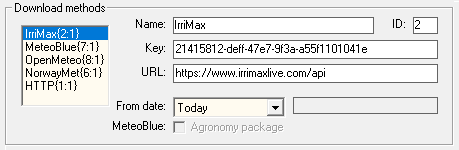
Services shipped with v3.1.233
| ID | Service | url | Parameters | Notes |
|---|---|---|---|---|
| 2 | IrriMax |
/?cmd=getsdbcsv
selected by user, format='yyyymmdd'
|
Uses MeteoBlue service
Only available to Sentek users From date as selected The forecast file is downloaded from Sentek Irrimax Server is the name of the Irrimax database |
|
| 7 | MeteoBlue | http://my.meteoblue.com/packages |
/basic-1h hourly values
/basic-1h_agro-1h with Agro package
?lat='latitude'&lon='longitude'
&hourly=evapotranspiration,etc
&format=csv
&apikey='apikey' optional
|
ET is only avaialable with 'Agro' package subscription
must select format: csv |
| 8 | OpenMeteo | http://api.open-meteo.com/v1/forecast |
?latitude='latitude'
&longitude='longitude'
&hourly=rain,et0_fao_evapotranspiration,etc
&apikey='apikey'
&format=csv
|
must select format: csv |
| 6 | NorwayMet | https://api.met.no/weatherapi/locationforecast/2.0/compact |
?lat='latitude'
|
link to web site |
| 1 | HTTP | https://www.domain.com/forecasts/latest.csv |
Any publically available file |
Additonal services can only be added on tab: Files Forecast file: shared\forecasts.txt
The url can be changed by user, but the parameters are hard-coded
Server is from tab: Download, and is saved with the Scenario
Latitude, Longitude is entered on tab: Locations, and is saved with the Location
Scenario Types
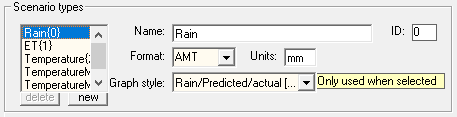
Scenarios have a 'type' - rain, ET, RH etc
| ID | Name |
|---|---|
| 0 | Rain |
| 1 | ET |
| 2 | Temperature |
| 3 | Max Temperature |
| 4 | Min Temperature |
| 5 | RH |
Users can add more
How a Scenario is used
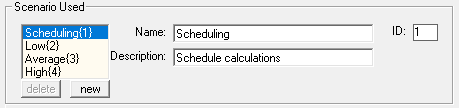
TODO
Select the scenario that will be used for predicting a full season
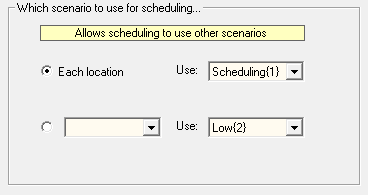
TODO
Files

tab: Files
TODO
'3.1.211
' attempt to append downloaded data to existing file - abandoned
' file re-downloaded if file date is different
' option download from Now-2 days note: saved in INI, not forecast file
' CalculateTotal - ET - use fractional days
'  append text to %Forecast% [5 days]
emails to Greg JFYI... (will be going in .online help) forecast debugging stuff (1) tab: Files 'save Response' ON a file with the raw data from API weather server is also saved eg: oysterbay_raw_YYYY_MMM_dd_HH_MM_SS.csv so should be a new file everyfor IRRIMAX, all the header line are stripped out, and just the 'cooked' data values saved to: oysterbay.csv other servers can be in JSON format (really weird) (2) For Irrimax, the first date/time should be 00:00 on the day eg Last reading on 19 Jan 08:00 at 19 Jan 13:00 the first line in csv should be: 19 Jan 00:00 TODO: I need to check what Prwin does with values between 00:80 and 13:00 - (should be skipping) Other API weather services will only return records *after* the time (3) For IRRIMAX the times are in local time of the 'location' MeteoBlue times are also in local time of GPS coordinate TODO need to doco other servers NorwayMet,OpemMeteo (4) tab:Report will alter all dates to From date: times are not changed output file: oysterbay_adjustdate.csv will generate a new file with the entered Rain and ET values output file: oysterbay_generate_dd_mmm_yyyy.csv 30% of rain will be on day 4, 70% on day 6 ET will vary each hour, and total might not be exact the file name will need changing on both ET and RAIN if used it will write over: oysterbay_adjusted.csv (5) a straight weather station file can be downloaded with https:// or it could be download: [none], and manually put in \shared folder This would allow using a previous seasons weather to get forcats values (6) Excel locks a csv file while it is loaded - so cant re-downlaod (7) File date set by ftp (8) >>>Difference between Total and Average? Valuse show OK on Forecast/Values Tab The IRRIMAX raw data is hourly, rain values are in mm (per hr), and ET is in mm/hr But Prwin needs/assumes 'daily' values on tab: Scenario 'Aggregate' is converting from hourly to daily Fruition has... Rain: none (so mm/hr) ET: total (so mm/day) --- on tab: Values '7-day Aggregate' is calculating how 'FORECAST_RAIN' and 'FORECAST_ET' will be calculated Fruition has... Rain: total (mm in 7 days) ET: average (mm/day that works ok for Fruition, but I also test plotting 'predicted rain' But with the Fruition settings it looks confusing, with 24 vertical bars each day, with values like 0.5 mm, 0.15 mm and the plot of predicted RZ1 values can also be confusing - it can go up each hour, but it's from hourly rain and not ET So on tab Amounts I have... Rain: total (so I can plot 1 bar of total mm in a day) ET: total
Techo stuff
| ID | Service | API URL | Values | Requires | Notes |
|---|---|---|---|---|---|
| 2 | IrriMax | https://www.irrimaxlive.com/api/?cmd=getsdbcsv&key=ABCDEFG&name=SERVER&from=YYYYMMDD |
Rain, ET | Server, APIKey | Sentek licence |
| Sentek csv format |
ESReadings
|
Date in Col_1
Rain in 07.Cooked (Col_15) ET in 14_Cooked (Col_29) |
|||
| 7 | MeteoBlue | https://my.meteoblue.com/packages/basic-1h_basic-day?lat=53.062082&lon=-0.068262&apikey=ABCDEFG |
Rain | lat/lon, APIkey | free for 1 year
date col_1
basic: rain col_6, RH col_9, temperature col_12
Time , convective_precipitation, felttemperature, isdaylight, pictocode, precipitation, precipitation_probability, rainspot, relativehumidity, sealevelpressure, snowfraction, temperature, uvindex, winddirection, windspeed
Agro package: Rain col_10, ET0 col_4,
Time, convective_precipitation, dewpointtemperature, evapotranspiration, felttemperature, isdaylight, leafwetnessindex, pictocode, potentialevapotranspiration, precipitation, precipitation_probability, rainspot, referenceevapotranspiration_fao, relativehumidity, sealevelpressure, sensibleheatflux, skintemperature, snowfraction, soilmoisture_0to10cm, soiltemperature_0to10cm, temperature, uvindex, wetbulbtemperature, winddirection, windspeed
|
| csv format |
|
date in Col_? rain in Col_? | |||
| 8 | Open-Meteo | http://api.open-meteo.com/v1/forecast?latitude=59.91&longitude=10.75&hourly=temperature_2m,relative_humidity_2m,precipitation,et0_fao_evapotranspiration&format=csv |
Rain,ET,RH | lat/lon | no charge
date col_1
precipitation,temperature_2m,relative_humidity_2m,et0_fao_evapotranspiration,evapotranspiration
|
| csv format |
|
date in Col_1 rain in Col_2 | |||
| 6 | NorwayMet | https://api.met.no/weatherapi/locationforecast/2.0/compact?lat=53.062082&lon=-0.068262 |
Rain | lat/lon | no charge |
| csv format |
Date/Time, AirTemperature, RH, WindSpeed, WindDirection, Cloud, Pressure, Rain
|
date in Col_1 rain in Col_8 | |||
| 3 | OpenWeatherMap | https://api.openweathermap.org/data/2.5/onecall?lat=53.062082&lon=-0.068262&exclude=hourly&units=metric&appid=ABCDEFG |
Rain | lat/lon | daily forecast for 8 days
needs api key |
| csv format |
Date,Rain,POP,Temp.Max,Clouds,Humidity,Pressure,dew_point,wind_speed,uvi
|
date in Col_1 rain in Col_2 | |||
| 5 | WeatherAPI | https://api.weatherapi.com/v1/forecast.json?q=53.062082,-0.068262&days=7&key=ABCDEFG |
Rain | lat/lon, APIKey | no charge for 7 day forecast |
| csv format |
TODO
|
date in Col_?
rain in Col_?

|
|||
| 4 | WeatherStack | https://api.weatherstack.com/forecast?query=53.062082,-0.068262&forecast_days=7&hourly=0&units=m&access_key=ABCDEFG |
Rain | Lat/Lon | no charge |
| csv format |
|
date in Col_?
rain in Col_?
Standard: $10/month 50,000 calls |
|||
GoogleMaps to get GPS Lat/Lon
| Location | Latitude | Longitude |
|---|---|---|
| Blenheim, NZ | -41.512321 | 173.959556 |
| Lincolshire, UK | 53.062082 | -0.068262 |
| Sydney, Australia | -33.856438 | 151.192648 |
| Chico, CA, USA | 39.695655 | -121.905637 |